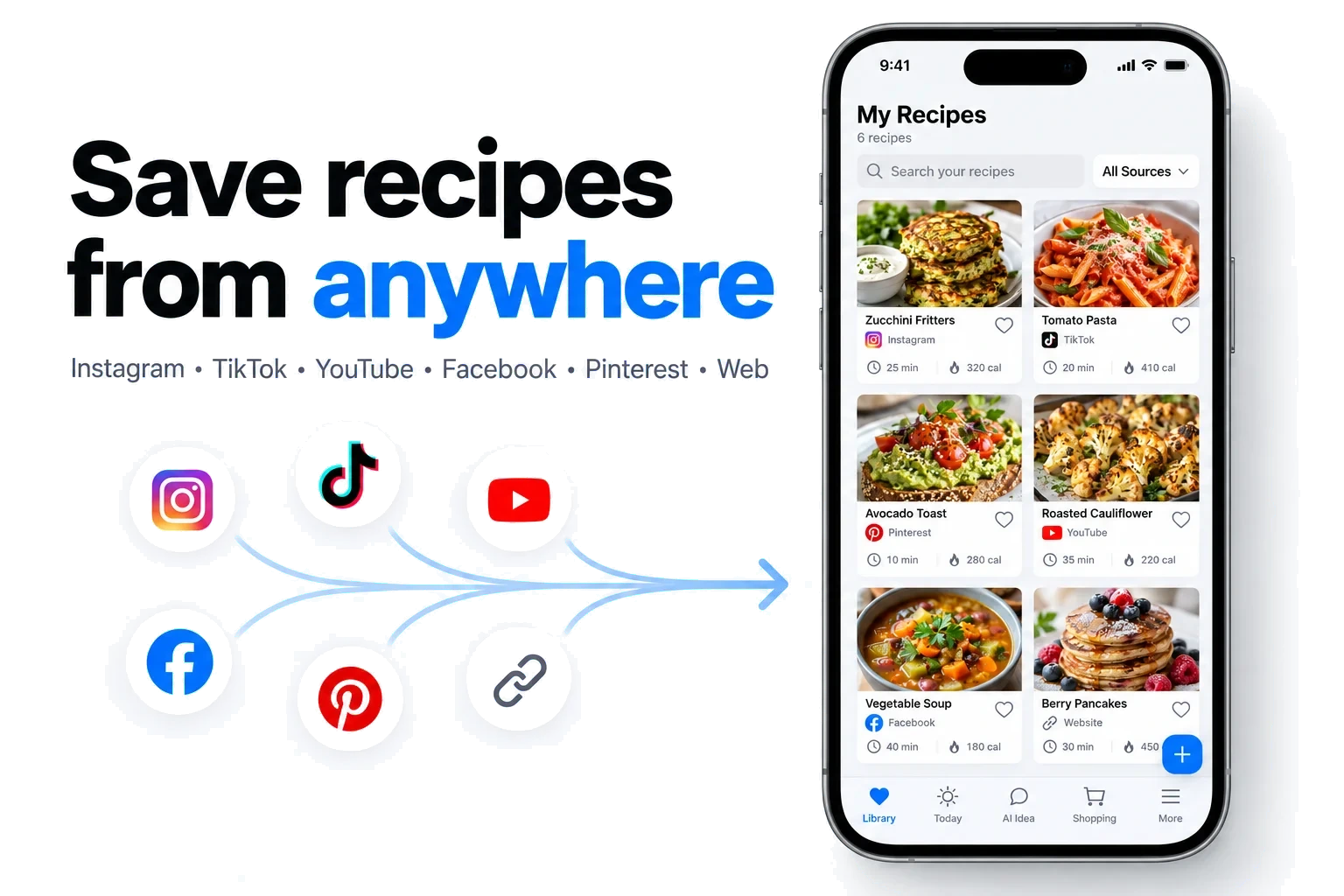
The short answer
RecipeAI is the best app to save recipes from TikTok in 2026 if you want more than a bookmark. Share a video from TikTok, Instagram, YouTube, Facebook or Pinterest — or any recipe website — and RecipeAI turns it into a clean recipe with ingredients and steps. Then it keeps going: meal plans, smart shopping lists, nutrition tracking, translation and a hands-free cooking mode, all in one app.
- Saves recipes from TikTok, Instagram, YouTube, Facebook, Pinterest, any recipe website, copied text and photos
- Reads captions, page text and spoken recipe details; keeps the original source attached
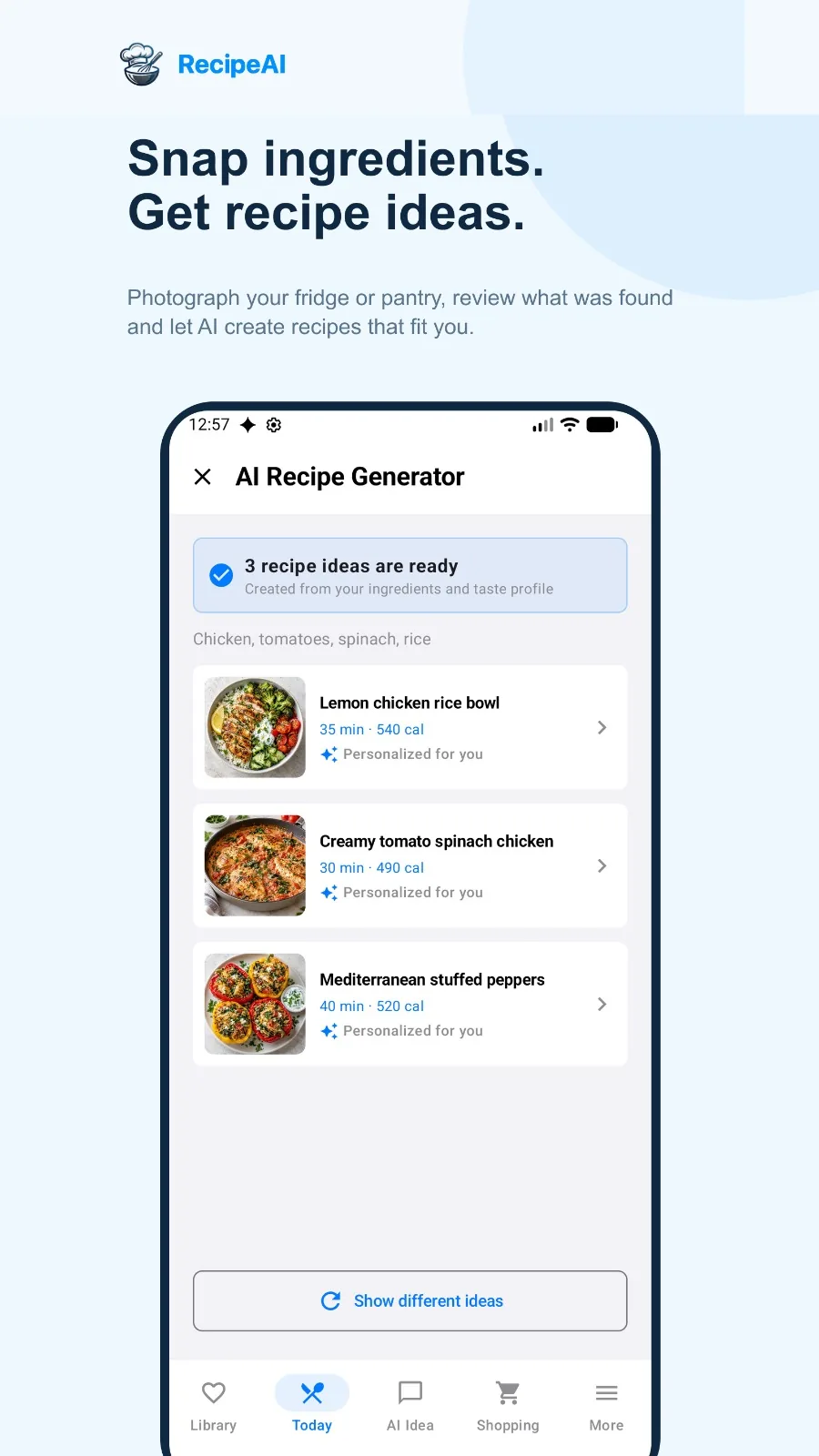
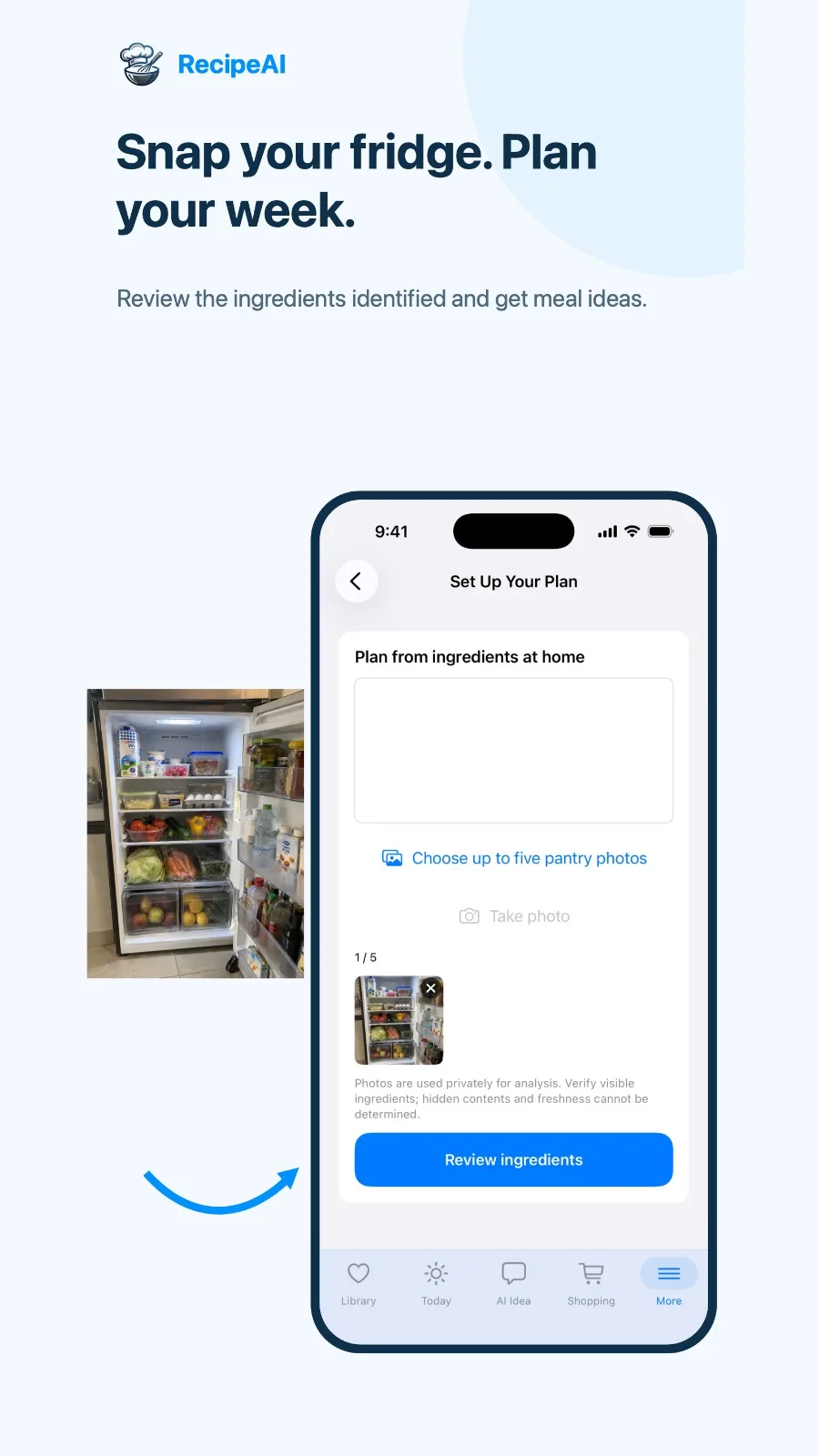
- Creates recipes and meal plans from typed ingredients or photos of your fridge and pantry
- Meal planner, smart shopping lists, nutrition tracking, translation and a hands-free cooking mode in the same app
- Shopping lists and the core food diary are free
Why TikTok’s save button is not a recipe box
Most of us have a folder of saved cooking videos we never cook from. The bookmark keeps the video, but not the recipe: the quantities are spoken at speed, half the ingredients appear for a second on screen, and the method lives in a caption you have to pause and scroll to read. When you finally stand at the stove, you are scrubbing back and forth through a 60-second clip with floury fingers.
Screenshots are no better. They end up mixed with receipts, memes and boarding passes, and a screenshot of an ingredient list cannot add anything to a shopping list, scale to six servings or tell you how many calories you just ate.
A real recipe saver solves a different problem. It reads the video, the caption and the page, pulls out the ingredients and steps, stores them in one searchable library with a link back to the creator, and then lets you do something with the recipe — plan it, shop for it, cook it. That last part is exactly what RecipeAI was built for.
How saving a recipe from a video actually works
When you share a TikTok, Reel or YouTube video to a recipe app, the app receives a link — not the recipe. To rebuild the recipe it has to read whatever the public post exposes: the caption or description, the text on the page, and in better apps the spoken words in the video. AI then organizes that material into a title, an ingredient list with quantities and numbered steps.
Quality depends on two things. The first is how much of the source the app reads: a caption-only importer misses everything the creator only says out loud. RecipeAI uses accessible captions, page text and spoken or transcribed recipe details together, so a recipe that is explained rather than written down can still come through (how social import works).
That is also why it does not matter how a video was made. Whether the recipe appears as text on screen, is only explained in a voice-over, or is not written anywhere at all, RecipeAI saves it as a properly organized recipe with ingredients and numbered steps.
The second is honesty about gaps. If a creator never says how much flour to use, a good importer leaves that quantity blank instead of inventing one. RecipeAI is built that way: quantities that are actually present are preserved, missing ones stay unspecified, and the original source stays attached so you can check it. Whatever app you use, give a new import a quick look before you cook — especially quantities, temperatures and allergens.
What to look for in an app to save recipes from TikTok
Sources it reads
TikTok is the start, not the finish. Look for Instagram, YouTube, Facebook, Pinterest and ordinary recipe websites too, so every recipe ends up in one library.
What it reads from a video
Captions alone miss recipes that are only spoken. Apps that also use speech and page text rebuild more complete recipes.
Photos and family recipes
Cookbook pages, printed cards and handwritten notes belong in the same place as your videos.
What happens after saving
Meal planning, shopping lists, nutrition and a proper cooking mode turn a collection into dinners you actually make.
Your phone
Check that the app runs on your phone before you invest time in building a library. RecipeAI is on Android today, and the iPhone version is not available yet.
The real price
Free tiers vary a lot — a cap on saved recipes, on imports per week, or on AI features. Know where the limit is before you start.
Language
If you cook from creators in other languages, built-in translation saves a lot of copy-and-paste.
RecipeAI in depth: everything it does
Here is RecipeAI in more detail: who it suits, what it does at every step and what to know before you start.

RecipeAI
Best for: Saving recipes from any video — and turning them into meals you actually cook
- Platforms
- Android (Google Play). The iPhone version is not available yet, and you can already join the waitlist.
- Price
- Free to start: save up to 10 recipes, 2 AI recipe generations and a shopping list that is completely free. Premium: $4.99/week, $9.99/month or $59.99/year.
RecipeAI starts where every recipe-saver should: save recipes from videos anywhere. Share a TikTok, an Instagram Reel, a YouTube video, a Facebook video or a Pinterest pin — or paste any recipe website, a message or copied text — and RecipeAI turns it into a clean recipe with an ingredient list and numbered steps, keeping the link to the original creator. It reads accessible captions, page text and spoken recipe details together, so a recipe that is explained out loud is not lost just because nobody typed it into the caption.
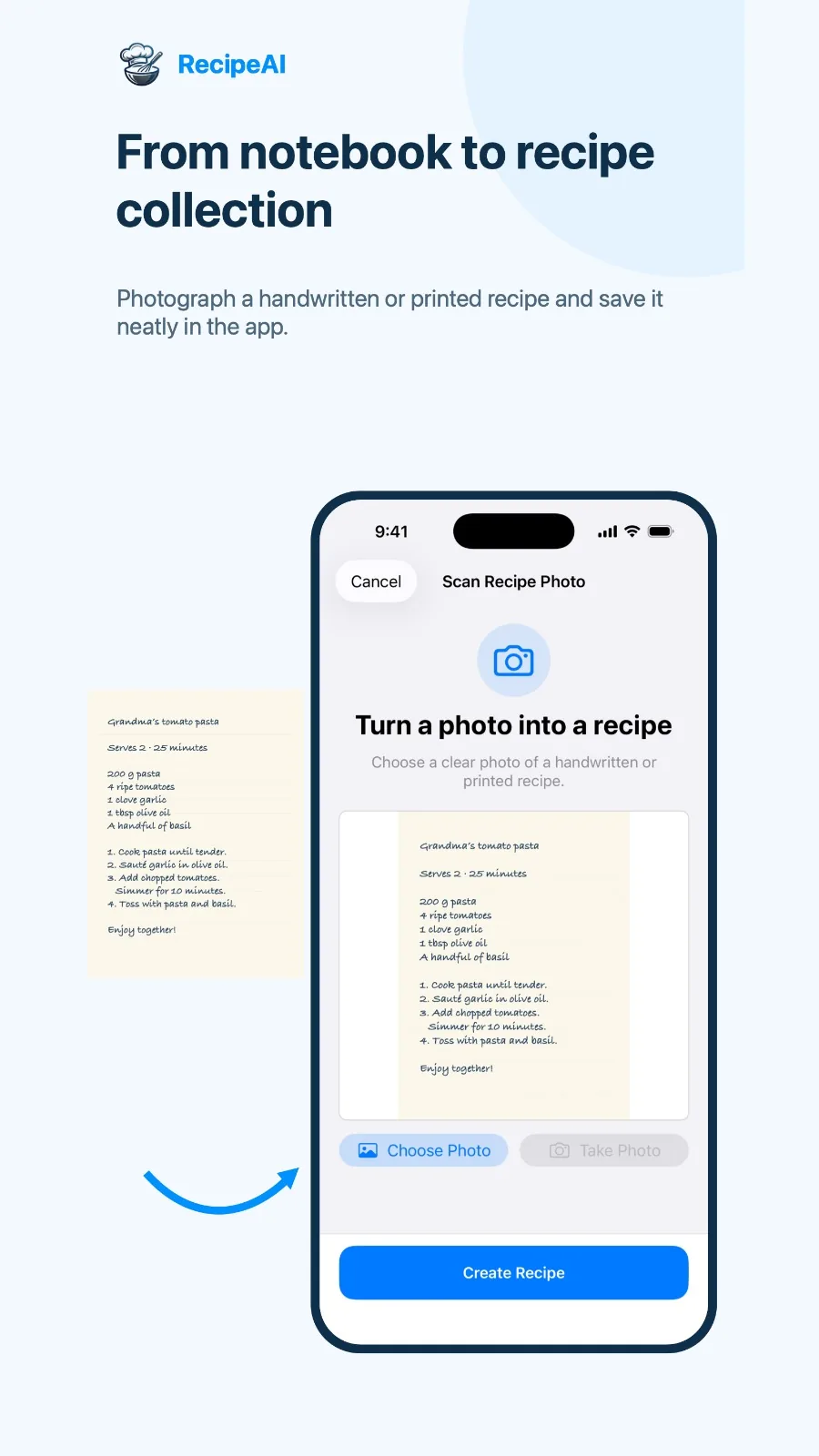
Processing happens in the background. You share the video, carry on scrolling, and a notification opens the finished recipe when it is ready. Family recipes come along too: scan a cookbook page, a printed card or a handwritten note and it lands in the same Library, searchable and filterable by source, next to everything you saved from social media.
What makes RecipeAI different is what happens after the save. Most recipe savers stop at a tidy collection. RecipeAI connects that collection to everything a real week of cooking needs: recipes created from the ingredients you already have — typed or from a photo of your fridge — personalized meal suggestions, an AI meal planner, smart shopping lists you can share for free, a Today nutrition tracker with calorie estimates from a meal photo, recipe translation into ten languages and a hands-free cooking mode with voice and timers. All of these in one app, and they all work with the same recipes.
Everything else RecipeAI does
Save recipes from anywhere
- TikTok recipesShare a cooking video straight from TikTok and get the ingredients and steps.
- Instagram Reels and postsTurn Reels and posts into recipes you can cook from.
- YouTube videosKeep the recipe and the link to the video for technique.
- Facebook, Pinterest and moreFacebook videos, Pinterest pins, messages and copied text, all in one Library.
- Any recipe websitePaste a recipe page URL and skip the life story above the recipe.
- Cookbooks and handwritten recipesScan printed pages, recipe cards, screenshots and clear handwriting.
- Pasted text and your own recipesPaste a recipe from a message or note, or write your own, and keep it in the same Library.
Decide what to cook
- AI recipes from your ingredientsType what you have or photograph your fridge, pantry or groceries and get recipes built around them.
- Personalized suggestionsIdeas ranked by your taste profile, dietary rules, saved recipes, meal history and the calories left today.
- Find real recipes onlineSearch for a dish and review real recipes with their publisher and source link before saving.
Plan and shop
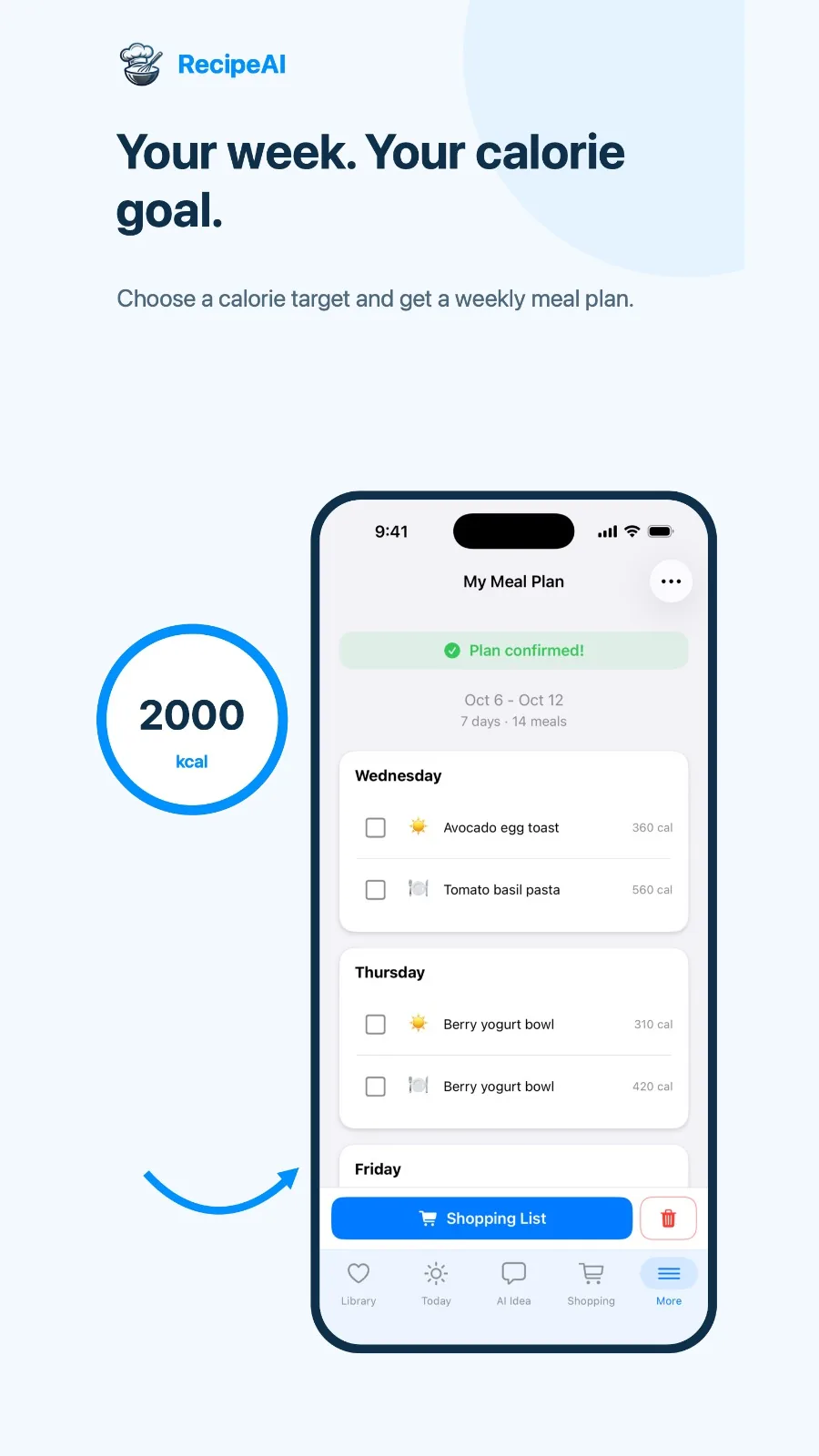
- AI meal plannerA weekly plan around your calorie goal and food preferences, ready to become a shopping list.
- Meal plans from your pantryPlan breakfast, lunch, dinner and snacks from typed ingredients or kitchen photos.
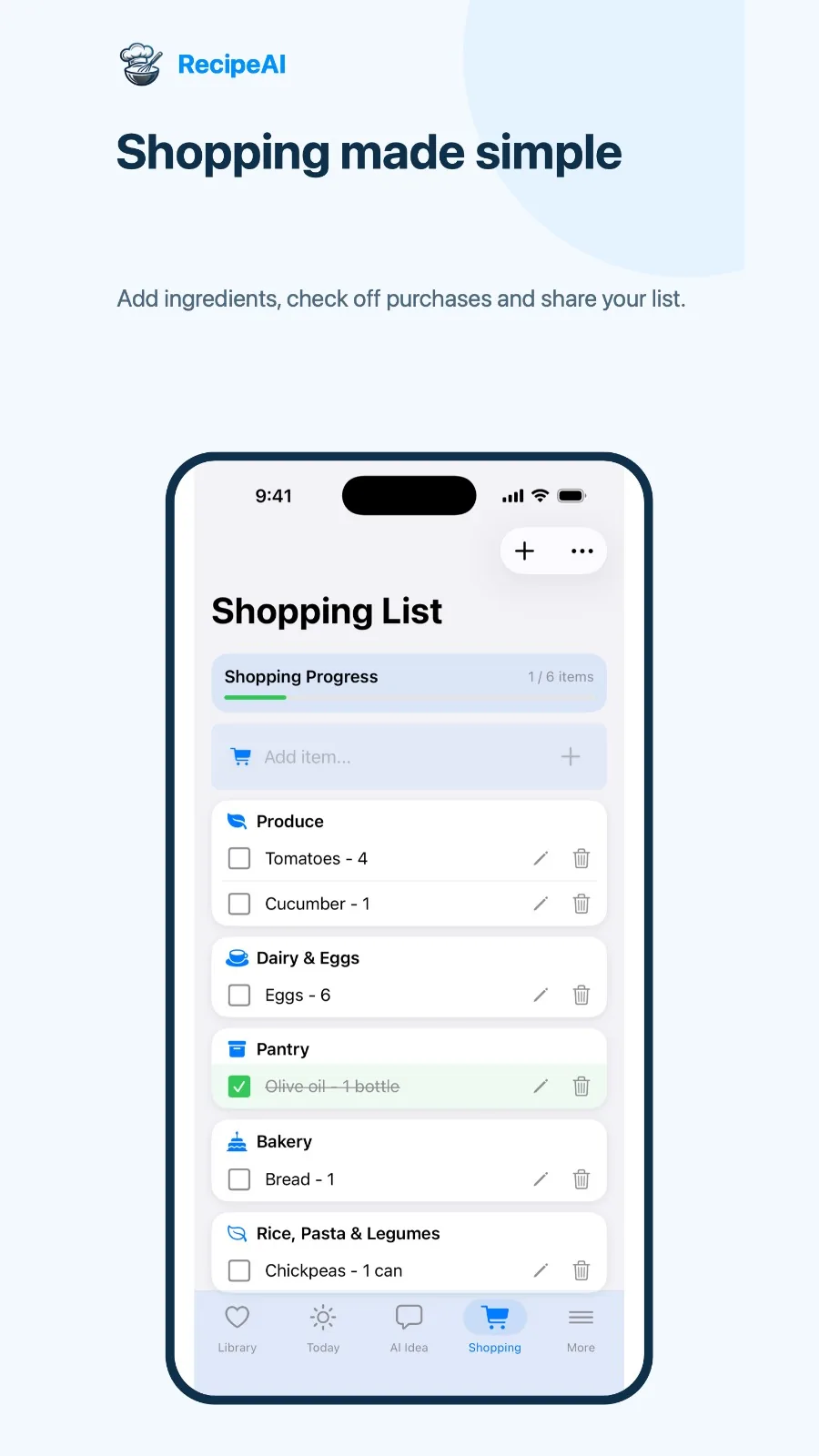
- Smart shopping listsIngredients grouped by category, with a confirmation before anything is merged into an existing list.
- Free list sharingSend a clean copy of your list on WhatsApp; the recipient imports it in one tap.
Track nutrition
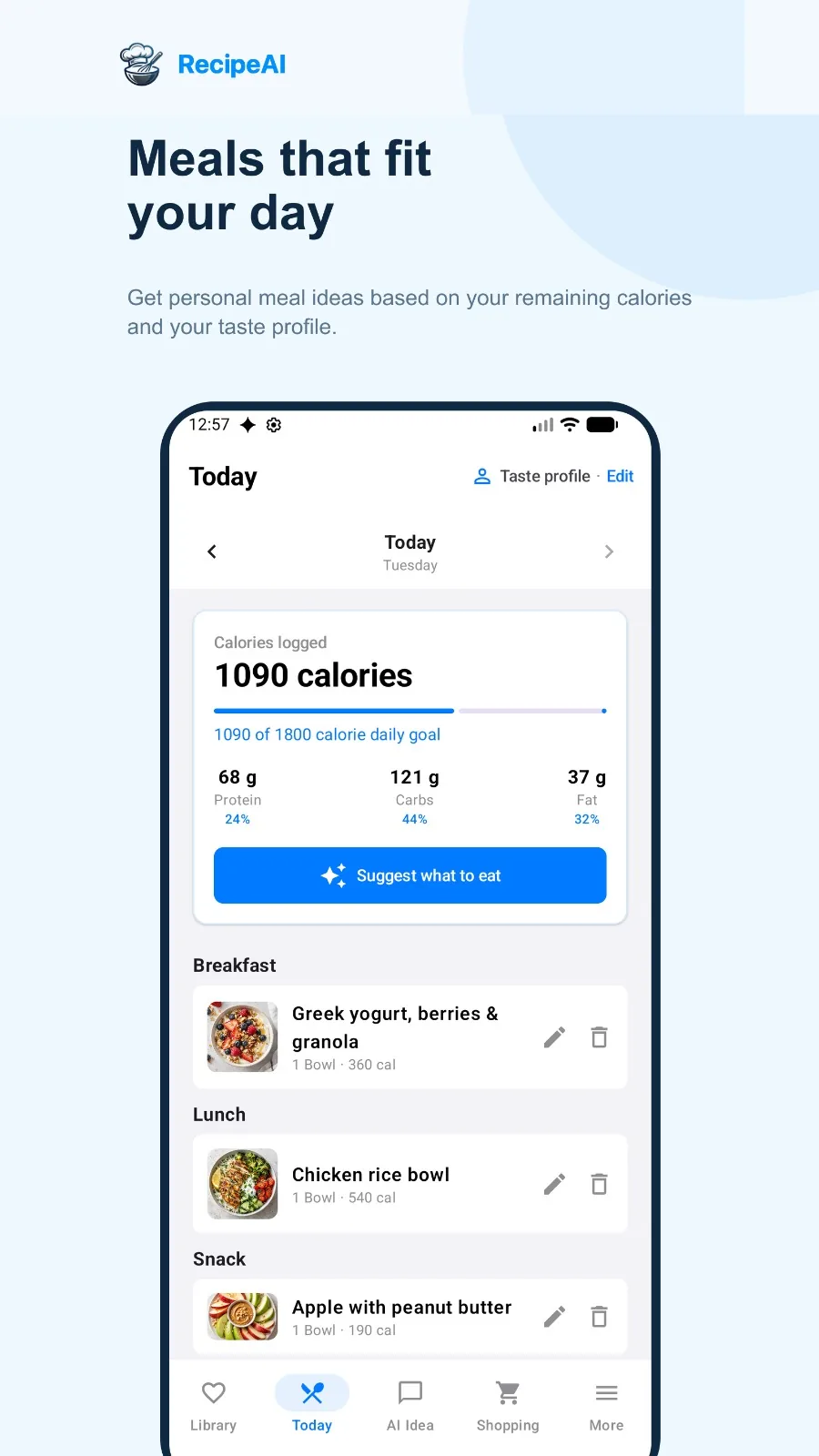
- Today nutrition trackerLog meals and see estimated calories, protein, carbs and fat against a daily goal.
- Calories from a meal photoPhotograph a plate for an estimate of calories and macros, then log it or find the recipe.
- Day, Week and Month diaryThe core food diary stays free, with totals and averages over time.
Cook with confidence
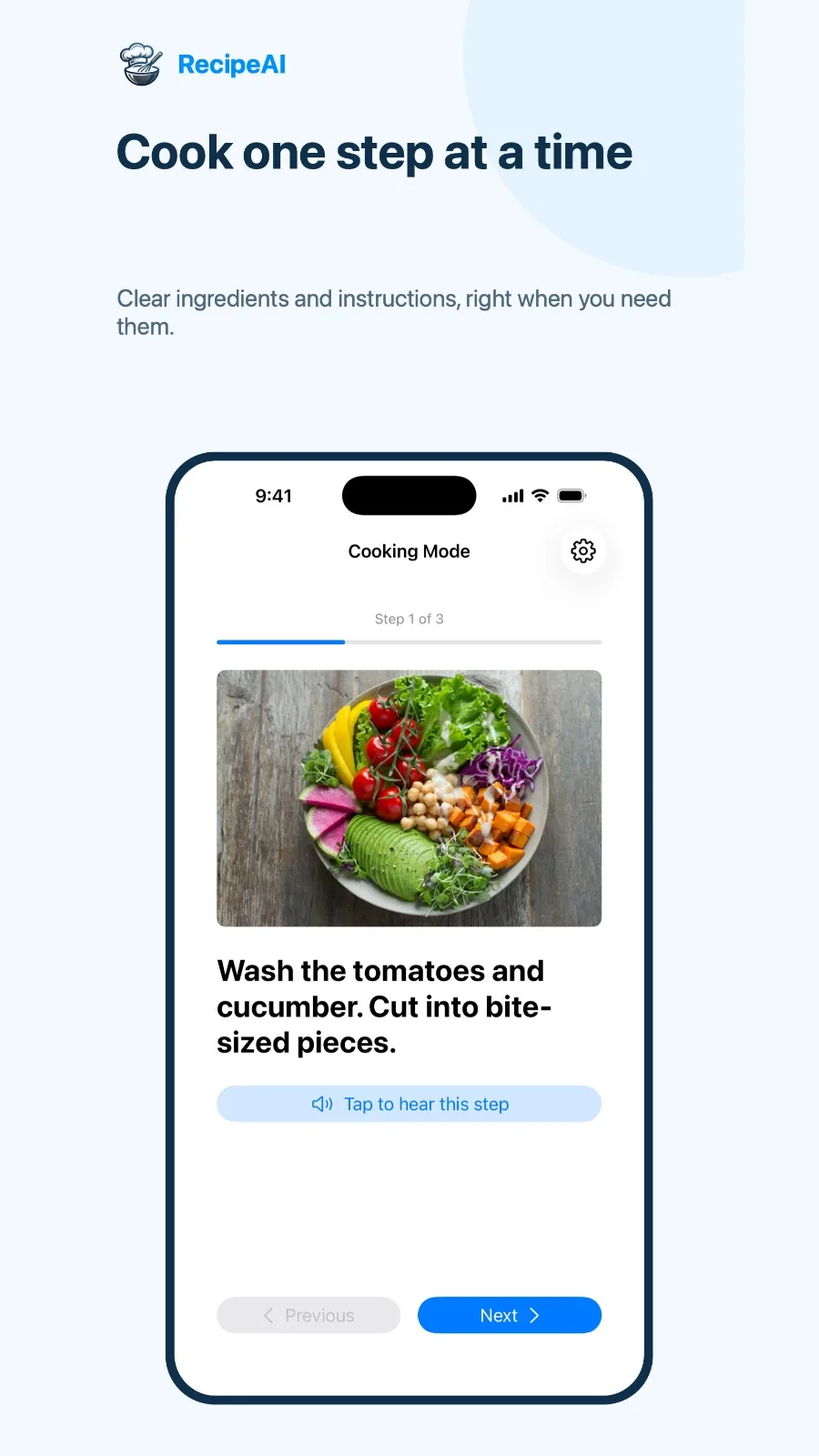
- Step-by-step Cooking ModeOne step at a time, with voice guidance that reads steps aloud and timers that keep counting.
- Recipe translationTranslate any saved recipe into ten languages without touching quantities or step order.
- Recipe organizerSearch, source filters, favorites, your own edits, notes, ratings and cooking photos.
- Assistant and recipe toolsAsk the AI assistant about a recipe, adjust servings, convert units and add a recipe to your calendar.
Worth knowing
- Available on Android today. Registration for the iPhone waitlist is open.
- The free plan saves up to 10 recipes, so a big collection needs Premium.
- Imports depend on what a public post exposes — private or deleted posts cannot be read by any app. Review new imports before cooking.
- Shared shopping lists are imported as a copy, so later edits do not sync between phones.
- Nutrition values and meal-photo calories are estimates, not medical advice.
How to save a recipe from TikTok (and everywhere else)
With RecipeAI on an Android phone, saving a recipe never means copying it by hand. You start from the Share button in the app where you found it — the whole thing takes a few seconds, and the recipe keeps processing in the background while you carry on scrolling.
Save a recipe from TikTok
- Open the TikTok cooking video and tap Share.
- Choose RecipeAI in the Android share sheet. If you do not see it, scroll the row of apps or tap More.
- RecipeAI processes the video and adds the organized recipe — ingredients, steps and the link to the original — to your Library. A notification tells you when it is ready.
Save a recipe from Instagram Reels and posts
- Open the Reel or post and tap the paper-plane icon, then Share.
- Pick RecipeAI, or copy the public link and paste it into the app.
- Open the finished recipe from your Library and review it before you cook.
Save a recipe from YouTube
- Tap Share under a public YouTube recipe video, or copy its link.
- Send it to RecipeAI.
- Cook from the organized recipe and open the original video whenever you want to see a technique.
Save recipes from Facebook, Pinterest and websites
- Share the Facebook video or Pinterest pin to RecipeAI, or copy a recipe page’s URL.
- Paste the link into RecipeAI if it did not arrive through the share sheet.
- Review and save. RecipeAI keeps the source link so the original creator is always one tap away.
Scan a cookbook page or a handwritten recipe
- Take a clear, evenly lit photo of one recipe, or choose an existing image or screenshot.
- RecipeAI reads the text and its structure — including clear handwriting.
- Compare it with the original, correct anything you need, and save it next to your video recipes.
Save a screenshot, pasted text or your own recipe
- Send a screenshot of a recipe to RecipeAI and get back a clean, properly organized recipe with ingredients and steps.
- Only have the text? Copy and paste it from a message, a caption or a note.
- Or write your own recipe in the app, and keep it in the same Library as everything you saved from videos.
From saved video to dinner: what RecipeAI does next
Saving is step one. Here is how one TikTok recipe travels through RecipeAI in a normal week — and why we built it as one app rather than five.
Sunday: plan the week
Ask the AI meal planner for a week built around your calorie goal and food preferences — plans can include recipes from your own Library, like the pasta you saved from TikTok. Short on ideas? Type what is in the fridge or snap a photo of your pantry, confirm the ingredients it detected, and get a plan from what you already have.
Monday: one shopping list
Turn the plan into a shopping list grouped by category. Before new ingredients are merged into an existing list, RecipeAI asks you to confirm, so nothing you already planned is overwritten. Send a clean copy on WhatsApp — sharing lists is free.
Wednesday: cook without touching the phone
Open the recipe in Cooking Mode: one step at a time, with the recipe image, built-in timers that keep counting if you leave the app, and voice guidance that reads each step aloud.
Every day: know what you ate
Log the meal in Today to see estimated calories, protein, carbs and fat against your daily goal, or photograph your plate for a calorie and macro estimate. Week and Month views live in the free food diary.
Any time: cook in your language
Found a great recipe from an Italian or Korean creator? Translate it into one of ten languages — quantities, temperatures and step order stay exactly as they were, and the original is always one tap away.
Frequently asked questions
What is the best app to save recipes from TikTok?
For most people we recommend RecipeAI. It saves recipes from TikTok and also from Instagram, YouTube, Facebook, Pinterest, recipe websites, copied text and photos, then lets you plan meals, build shopping lists, track nutrition, translate recipes and cook step by step in the same app. It is available on Android now, and the iPhone waitlist is open.
Can an app save a recipe from a TikTok video if the recipe is only spoken?
Yes, if the app reads more than the caption. RecipeAI uses accessible captions, page text and spoken or transcribed recipe details together. If the creator never mentions a quantity, RecipeAI leaves it blank rather than inventing it, and keeps the link to the original video so you can check. It works whether the recipe is written on screen, only spoken in a voice-over, or not written anywhere at all.
How do I save a TikTok recipe to my phone?
Install RecipeAI on Android, open the TikTok video, tap Share and choose RecipeAI. The recipe is processed in the background and appears in your Library with ingredients, steps and the source link. You can also copy the video link and paste it into the app.
Is there a free app to save recipes from TikTok and Instagram?
RecipeAI is free to start: the free plan saves up to 10 recipes, includes 2 AI recipe generations and a shopping list that is completely free, along with the core food diary. For a bigger collection, Premium costs $4.99 per week, $9.99 per month or $59.99 per year.
Can I save recipes from Pinterest and Facebook too?
Yes. RecipeAI works with public recipe content from Pinterest, Facebook, Instagram, TikTok, YouTube and recipe websites, as well as copied text and messages. Everything ends up in one Library.
Is RecipeAI available on iPhone?
The iPhone version is not available yet. You can already join the waitlist. On an iPhone, tap any download button on recipeai.ai and leave your email. Until then, RecipeAI is available for Android on Google Play.
Can I scan recipes from a cookbook or a handwritten card?
Yes. Take a clear photo of a printed page, a recipe card or a handwritten note, and RecipeAI reads the text and structure so you can review and save it next to your video recipes. Clear handwriting works best.
Can I save a recipe from a screenshot, or add one myself?
Yes. Send a screenshot of a recipe to RecipeAI and you get a clean, properly organized recipe. You can also scan handwritten recipes, paste a recipe’s text when that is all you have, or write your own recipe in the app.
Can a recipe app tell me what to cook with what is in my fridge?
RecipeAI can. Type your ingredients or take photos of your fridge, pantry or groceries, confirm what it detected, and get recipe ideas or a full meal plan built around them.
Do recipe apps count calories?
Some do. RecipeAI includes a Today tracker with estimated calories, protein, carbohydrates and fat, a daily calorie goal, a free Day, Week and Month food diary, and calorie estimates from a photo of your meal. All nutrition values are estimates, not medical advice.
Can I translate a recipe saved from a video in another language?
Yes. RecipeAI translates saved recipes into English, Spanish, French, German, Italian, Portuguese, Arabic, Russian, Hebrew or Simplified Chinese. Quantities, units, temperatures and step order stay the same, and you can switch back to the original at any time.
Does RecipeAI have a hands-free cooking mode?
Yes. Cooking Mode shows one step at a time with the recipe image, includes timers that keep counting if you leave the app, and offers voice guidance that reads steps aloud so you can move through the recipe without touching the phone.
Will my recipes be public?
No. Your RecipeAI Library is personal and is not a public feed. Sharing, such as sending a shopping list, only happens when you choose to do it.
Transparency
RecipeAI is our app, and this guide was written by the RecipeAI team. There are no affiliate links and no paid placements.